What the office stops doing by hand
A feature list is only worth reading if it changes a working day. Below is what each part of DV Soft School Management takes off the desk, with the real screens it takes it off, in roughly the order a school feels it.
Collection you can read without adding it up
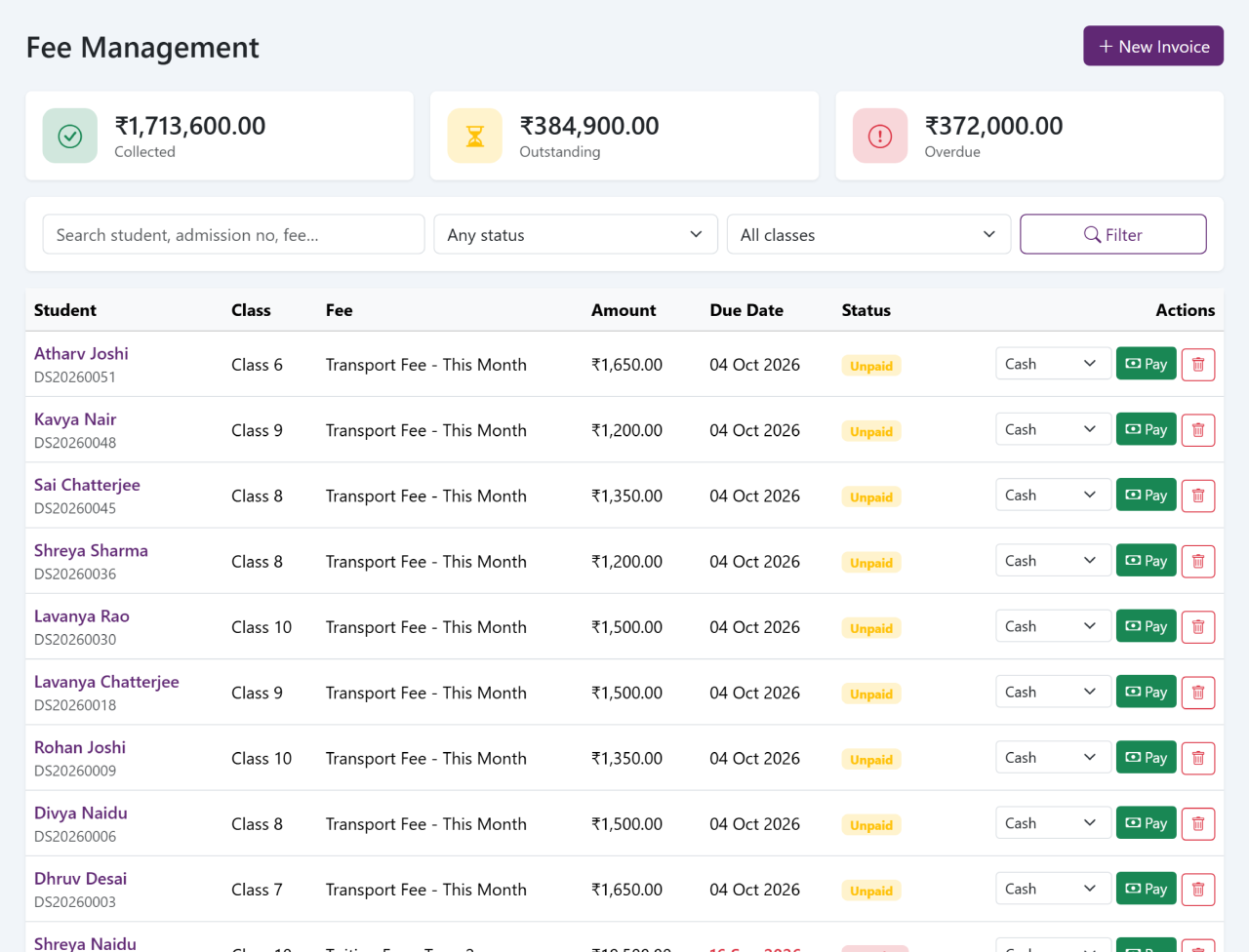
Set the fee heads and instalments for a class once, and every student in that class gets an invoice against them — in the currency your school charges in.
Take the money at the counter and the numbered receipt comes out with it. Take part of it and the balance carries forward on its own. Nobody totals the day at six o'clock either: the figure for a day, a month or a term is the same entries, added up by the system that recorded them.
- Fee heads and instalments set per class
- An invoice per student, generated rather than typed
- Numbered receipts, printed or saved
- Part payments, with the balance carried forward
- Collection by day, month, term and fee head
The Friday job nobody has to do any more
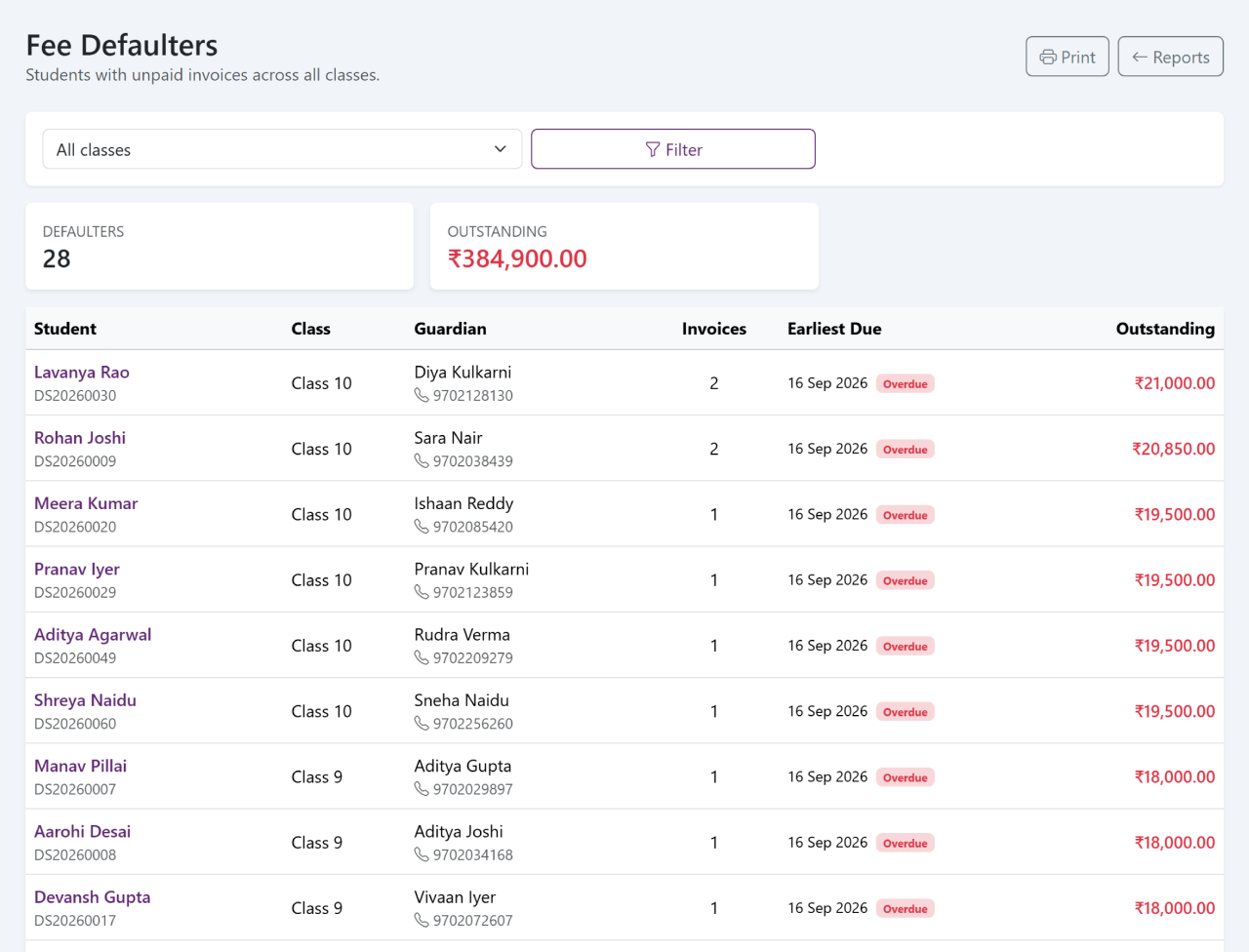
The list of overdue fees is not prepared. It is the fee data you already have, sorted by what is outstanding — by class, by amount, by how long it has been due.
Every line carries the student and the guardian to speak to, so the follow-up starts from a list rather than a search through the admission register. A part payment shows as the balance that is left, not as an unpaid invoice.
- Outstanding by class, by amount, by due date
- The guardian named beside each student
- Part payments shown as a balance, not a blank
- The same list the next morning, already up to date
One class, one screen, one minute
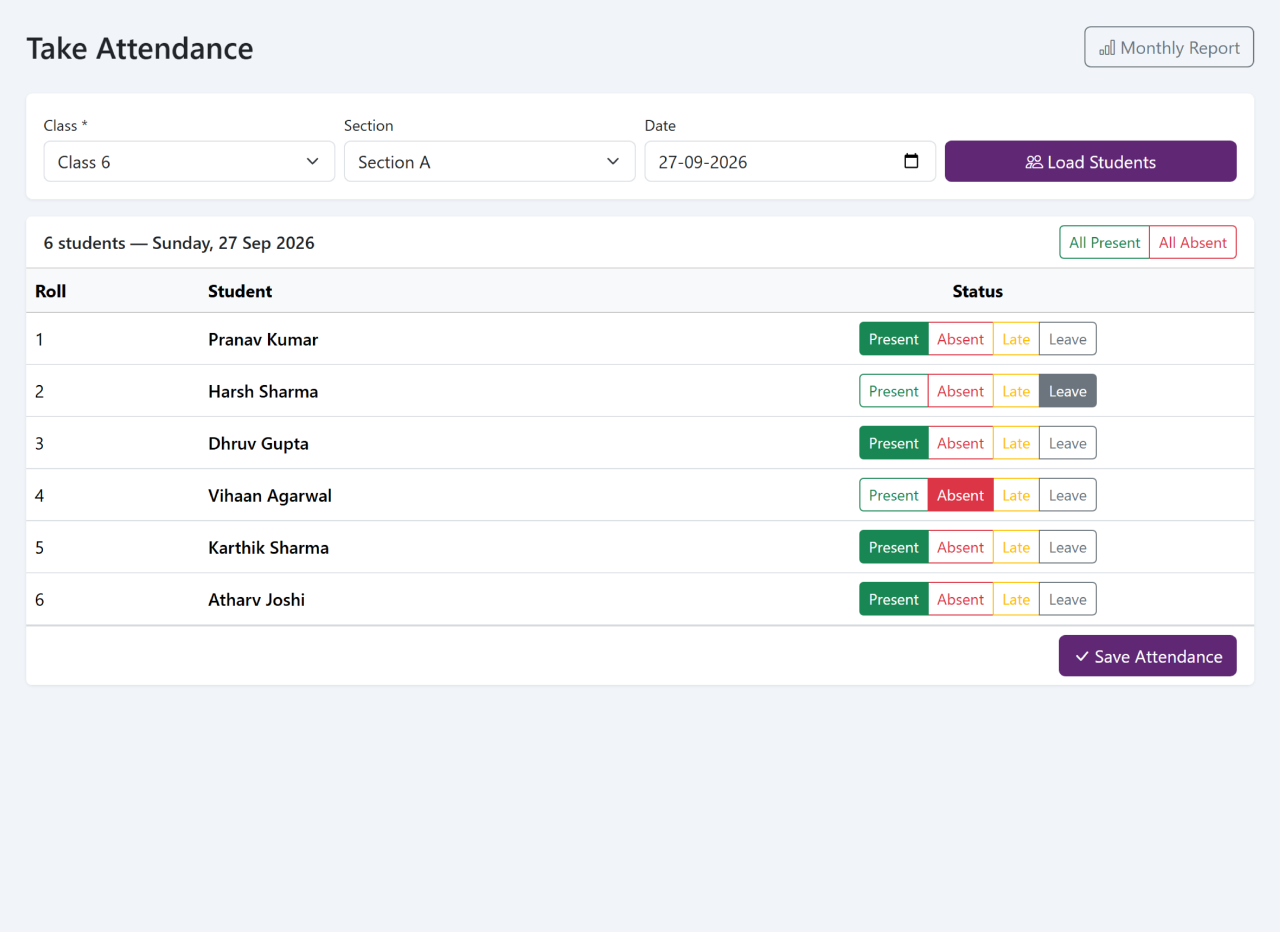
The register opens with everybody present. Tap the few who are not, save, and the day is recorded — against your school's own date and clock.
Everything after that is arithmetic, and arithmetic is not work for a teacher: the monthly percentage per student, the day's absentees class by class, and the same figures a parent sees in the portal.
- Present by default — you only touch the exceptions
- The day's absentees, class by class
- Each student's monthly percentage, already worked out
- Recorded against the date, so a correction is a correction
The front desk, written down
What arrives at the front desk is usually remembered by whoever took it. This is the part that turns it into a record somebody else can pick up.
Enquiries
Each admission enquiry, with what was asked, who took it and what was promised next.
Visitor book
Who came in, whom they met, and the time they arrived and left.
Call log
Calls in and out, with the caller, the reason and whatever follows from it.
Complaints
A complaint logged, assigned and closed, with a date against each step.
Marks in once, report cards out
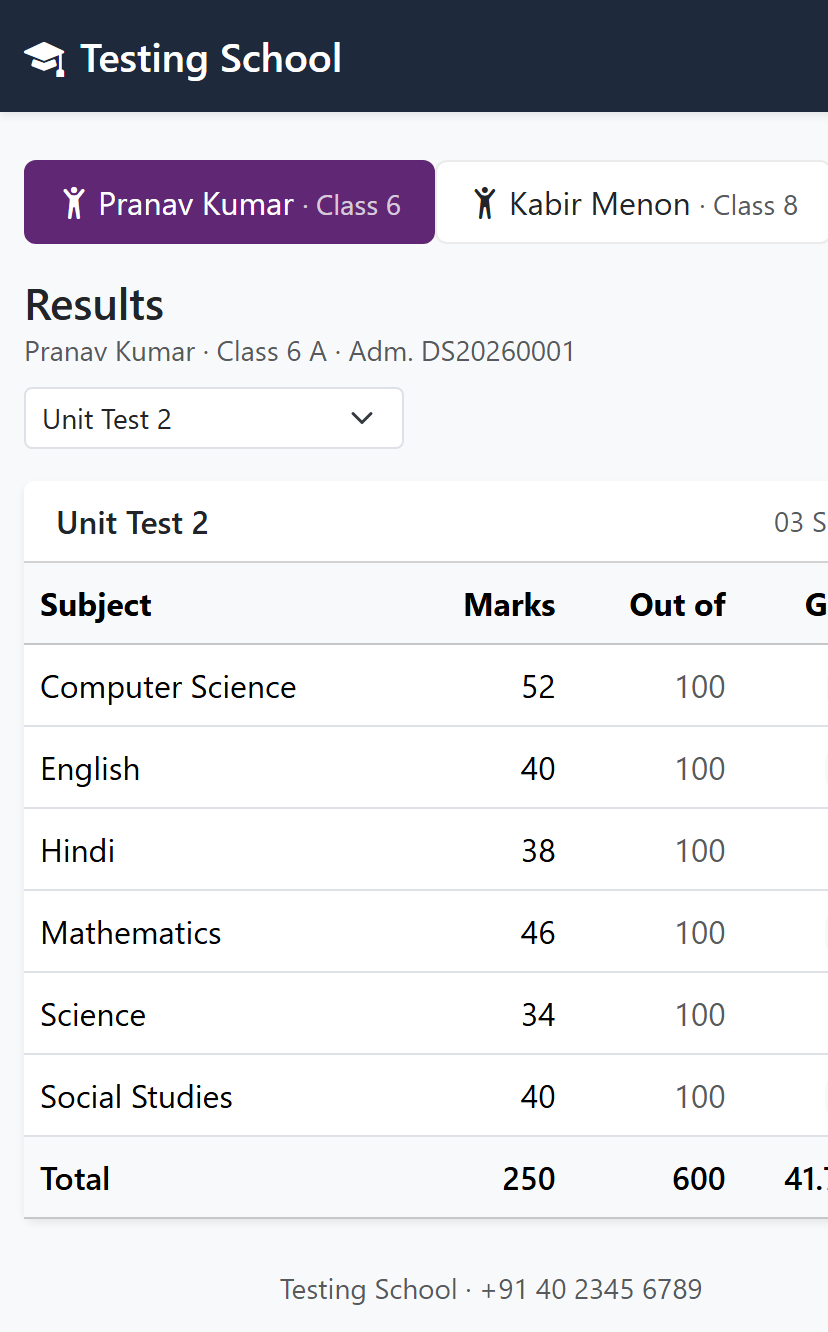
Entering marks is the only typing. One subject for the whole class on a single screen, against the maximum that exam carries — totals, percentages and grades follow from it.
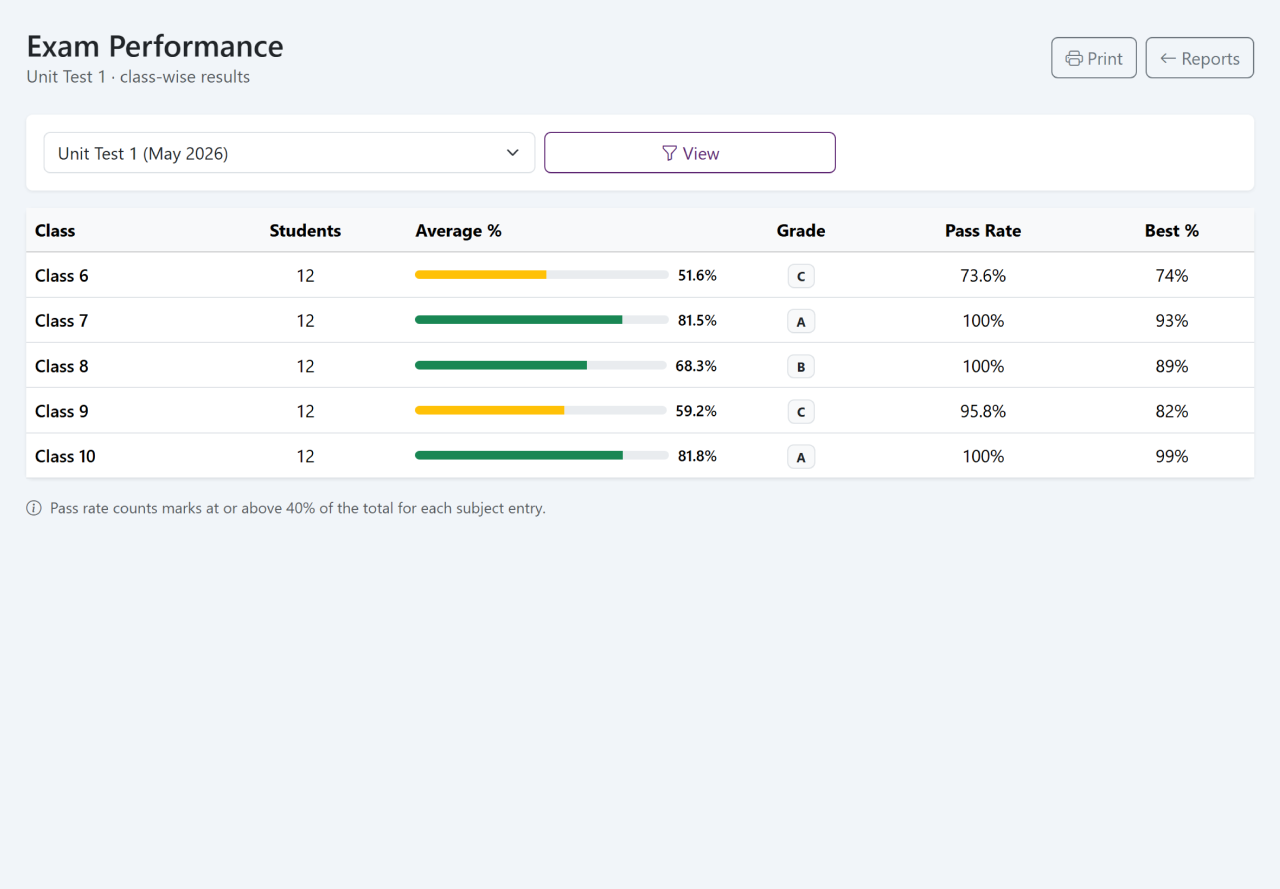
Report cards print for one student or a whole class, in the same format every term. The performance report is the same marks read the other way round: how a class did subject by subject, and which section is behind before the term ends rather than after it.
- Mark entry by subject, a class at a time
- Totals, percentages and grades worked out as you enter
- Report cards for one student or the whole class
- Class averages, pass rates and the spread of grades
The same care for the people who run the school
Teaching and support staff sit in the same system as the students, not in a second file on somebody's desktop.
Staff attendance
Daily attendance for staff, with the same monthly view the classes get, so a month's record is a lookup and not a reconstruction.
Leave
Leave recorded against each member of staff, so what has been taken and what is left is on the screen rather than in somebody's memory.
Payroll
Monthly salary per member of staff with allowances and deductions, in your currency, and a record of what was paid and when.
Every parent sees their own children, and no others
A parent signs in and finds the children linked to them. Not the class, not the section, not a list they can scroll past. There is no view that widens.
Most of what the office answers on the phone is already on that screen, which is the reason for putting it there. It is the school's own pages on the parent's own phone — any phone, nothing to download, nothing to set up.
- Attendance, day by day and month by month
- Marks and report cards once the school publishes them
- Fees paid, receipts, and what is still due
- Homework set for that child's class
- Notices from the school
The answers the board asks for
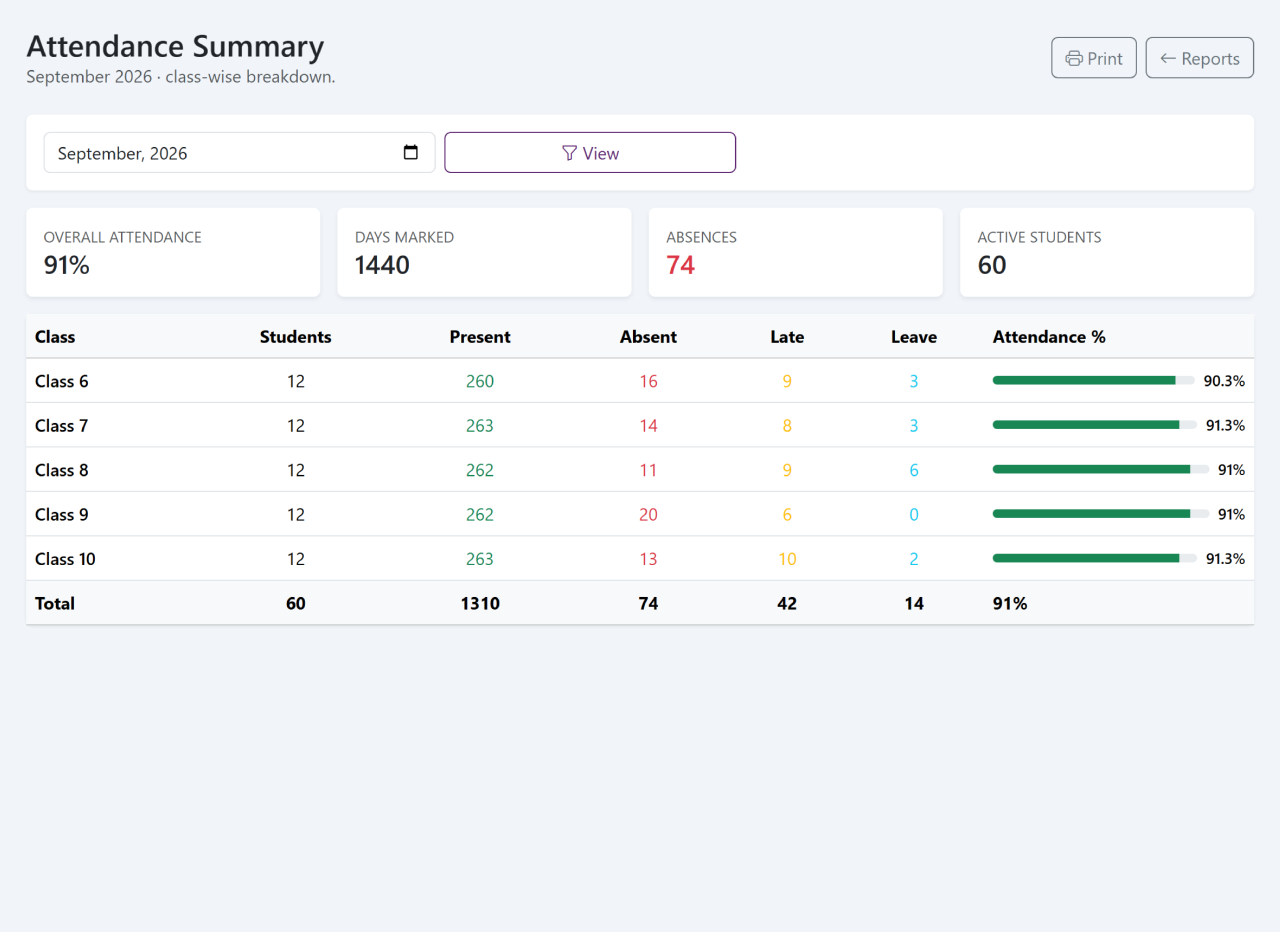
Reports are not prepared here. They are opened. Each one is built from what the office entered during the week anyway, so the question and the answer are a day apart at most.
- Fee defaultersWho owes what, and for how long
- Fee collectionA day, a month or a term, by fee head
- Income against expenseFees in, spending out, over your period
- Attendance summaryBy class and month, with those falling behind visible
- Exam performanceA class across subjects, a student across the term
- Student numbersBy class and section, and how they have moved this year
Papers that do not go missing with the cupboard key
A school is asked for documents years after a student has left. Keeping them against the record rather than in a file is the difference between a minute and an afternoon.
Certificates
Transfer, character and proof-of-study certificates printed from the student record, so the details on them are the details you hold.
Documents
Scans and papers kept against a student or a member of staff, where the next person to need them will look.
Health records
Held over all the years a child is with you, rather than starting again with each class teacher.
Log and backups
An activity log of who changed what and when, and backups you can take and download yourself.
Your school, on its own terms
The system fits the school rather than the other way round — wherever in the world the school happens to be.
Bring your student list
Students come in from the Excel or CSV file you already keep, not typed in again one by one.
Your currency
Fees, receipts, payroll and reports in the currency your school charges in.
Your timezone
Attendance, dates and the activity log follow your local clock.
Your dates
Imported lists are read day-first, month-first or year-first, as your school writes them.
See it against your own school
A demo reads better with your fee structure and a real class list than with a sample school. Two months free. Pricing only once you are satisfied.